

THE L&L BLOG / Scrivener for iPad and iPhone

Scrivener for iOS: Exporting Single Files

A writing app wouldn’t be much use if you couldn’t get your work out of it. In an earlier blog post, we talked about Compile, which allows you to export or print your entire Draft folder (or a subfolder of it) as a single document, piecing together the fragments of your text into a complete manuscript.

Sometimes you’ll want to export (or print) individual documents from Scrivener, however. Fortunately, this couldn’t be simpler: just tap on the “share” button at the bottom of the editor, choose a file format, and off you go. You can choose to email the document to someone, print it, or open it in another app.
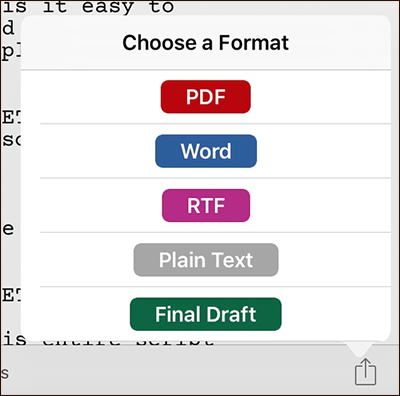


Scrivener allows you to export to PDF, Word (.docx), RTF, plain text or Final Draft (.fdx) formats, which means that you can easily share a document with someone on a PC, open a text document in Pages, or send a script document to Final Draft for some final touches.

Scrivener for iPad and iPhone

The Big Scrivener Survey

Keith Blount / 13 OCTOBER 2020

Got fifteen minutes to spare? Help us shape the future of Scrivener by completing our survey.

READ MORE
Scrivener for iPad and iPhone

Version 1.1 of Scrivener for iOS

David Johnson / 8 JUNE 2017

We’re delighted to announce that in the next week or so, we'll be releasing our first major update...

READ MORE
Scrivener for iPad and iPhone

Scrivener in App Store Best of 2016

Keith Blount / 8 DECEMBER 2016

Many thanks to the lovely Apple folk at all the stores that have included Scrivener for iPad in their...

READ MORE

Keep up to date

Sign up for the latest news, writing tips and product announcements.
Delivered straight to your inbox.

This field is for validation purposes and should be left unchanged.