

Drilling through a hefty binder of hierarchical files on an iPhone can be a chore, so Scrivener on iOS lets you bookmark documents to make them easily accessible. Just tap the ribbon icon in the editor footer to add the file to a special “Bookmarks” group at the top of the binder. You can also swipe left on a row in the binder and bookmark the item from the “More” menu.

Tap a document’s bookmark icon to toggle it on or off.
Bookmarked folders appear in the path menu from the binder navigation bar, so you can jump to them directly from anywhere in the binder. The “Move To” menu also lists bookmarked folders at the top to simplify restructuring your project. When you no longer need an item bookmarked, swipe its row in the binder for the “Remove” option (under “More” if you’re not viewing the bookmarks list), or tap its bookmark icon again.
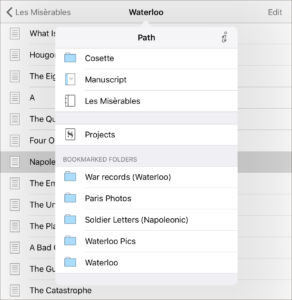
Bookmarked folders are available from anywhere in the binder.
Bookmarks on iOS sync with the “Favorites” list on Windows and macOS, so you can quickly load your documents no matter where you’re working.