

Scrivener has features that can help get the first draft of your novel you over the finish line.
Completing a first draft of a novel is a big accomplishment, and it’s not easy if it’s your first time. Scrivener has a number of features that can help you complete your draft. In this article, we look at how these features can get you to The End.
What is a good first draft?
In a recent article, we looked at what a good first draft should contain. A first draft isn’t perfect; it’s the scaffolding of a story that you refine through the revision process, which may cover several drafts.
This draft should be rough and incomplete, but it should be coherent. It should tell the entire story, present all the main characters, and contain all the key plot points. This draft is for you, not for anyone else to read or judge, though if you work with a critique partner, they are likely to understand that what they read is not finished.
Getting to The End
Typing those two words, The End, on the last page of your draft is a moment to let out a sigh of relief. But to get there, you’ll face many hurdles. Your motivation will wax and wane, and your interest in the story and characters may change. Sometimes you’ll feel like you’ve written a great novel, and at other times you’ll be tempted to abandon it. But you need to press on and get to The End.
Write regularly
The most important way to finish your draft is to write regularly. For some people, this will be every day. For others, it may only be one or two days a week, such as on the weekend. Some writers get up early, before work, to write 500 words or so. Others write in the evening after they’ve done housework and put the kids to bed. It’s important to try to fit some writing into your schedule, whether it’s every day, every few days, or on specific days of the week. This helps keep your momentum going.
Set session and project word count targets
One of the best ways to stay motivated as you write your first draft is to set targets for your writing. In How Much Should You Write Each Day; and When Should You Stop Writing?, we look at daily writing session targets. Everyone is different, and their schedules may prevent them from writing a lot.
In Scrivener, you can check the statistics for your project, see how much you write each day, and set targets for sessions, files, and projects. Track Statistics and Targets in Your Scrivener Projects looks at this in detail.

And Scrivener’s writing history screen can help keep you motivated, showing how much you’ve written each day and each month.
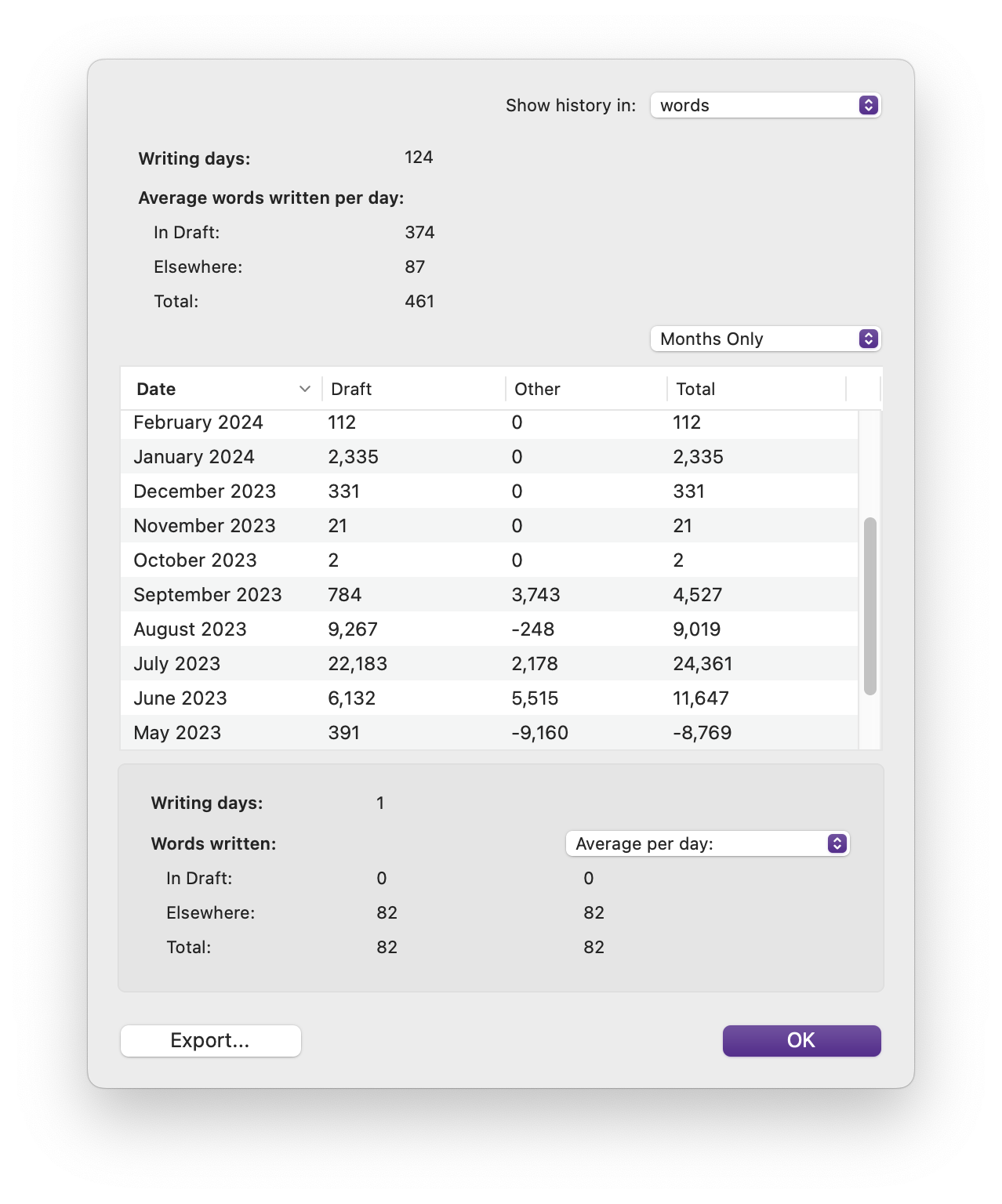
That said, some writers get stressed by having these targets, so you may want to turn off all of Scrivener’s word count display features and just write until you’ve completed your draft.
Try using a story structure
Many writers begin a novel with a great idea and interesting characters, and it starts off with a bang in the very first pages. But when they get to the middle of the novel, they start to flag. As the story gets more complex, it’s important to ensure that all the key plot points and characters are in the right place, and juggling this can be difficult.
Even if you’re a pantser – someone who doesn’t outline in advance – you might want to look at what you’ve already written and see if it fits into an existing story structure. This can give you a high-level view of your story and help you work out the plot. There are several story structures, and this article discusses five books about the topic. One popular story structure is Save the Cat. In this article, we discuss how you can work with Save the Cat in Scrivener.
You probably shouldn’t try to shoehorn your novel into a story structure, but analyzing different story structures may help you figure out how to organize scenes and chapters, and look at the overall story arc, when you’re struggling.
Work someplace else
Sometimes you might get into a rut because you’re working in the same place, seeing the same things, and your brain needs a change. Try working someplace else. Go to a coffee shop, sit outside if the weather’s nice, ask a friend if you can work at their house occasionally.
When Allison K. Williams was a guest on the Write Now with Scrivener podcast, she said: “I like to check into a hotel and write 8,000 words in four days, because I work better when I have one steady, deep-focus time to do my work.”
You may also benefit from Allison’s book, Seven Drafts, which discusses what should be in your first draft, as well as the various drafts you go through as you revise and edit your novel.
What’s next?
In On Writing, Stephen King suggests that after you have completed your first draft, you should put it aside for “a minimum of six weeks. During this time, your manuscript will be safely shut away in a desk drawer, aging and (one hopes) mellowing.”
When you come back to your draft, it’s time to start the revision process. Scrivener has powerful features that can help you as you edit and revise. You should also understand the difference between revision and editing, and when you should perform each of those tasks.
You can use Scrivener’s revision mode, and you can insert annotations and comments as you re-read your draft, making notes about things you want to change. You’ll probably go through several drafts before your novel feels finished, so take your time, rediscover what you’ve written, and start refining it.
Kirk McElhearn is a writer, podcaster, and photographer. He is the author of Take Control of Scrivener, and host of the podcast Write Now with Scrivener. He also offers one-to-one Scrivener coaching.